What an online assessment looks like
Most OAs arrive as a link with a deadline. Once you start, a timer runs for the whole test, and the questions come in a few standard shapes.
| Section | What it asks | What is scored |
|---|---|---|
| Coding | One to four algorithm problems with hidden test cases | Tests passed, sometimes speed and code quality |
| Multiple choice | Language features, output of a snippet, CS fundamentals | Correct answers |
| SQL and data | Write a query against a given schema | Tests passed |
| Debugging | Fix a function that fails its tests | Tests passed |
| Aptitude | Numerical, logical or verbal reasoning | Correct answers within the time |
Timers are usually tight, often 60 to 120 minutes for the whole test, and some sections cannot be revisited. That is why speed matters as much as accuracy in any assistant you use.
How Solvro handles each question type
Solvro is a desktop app, so it works the same way on any assessment site in any browser. Everything starts from a screenshot.
Coding problems: Coding Test mode
- Press CtrlShiftS to capture the problem. Long statements that need scrolling can be captured in several parts, up to 20 captures in one request.
- Press CtrlEnter to send.
- Read the approach, the time and space complexity, and the code in your default language.
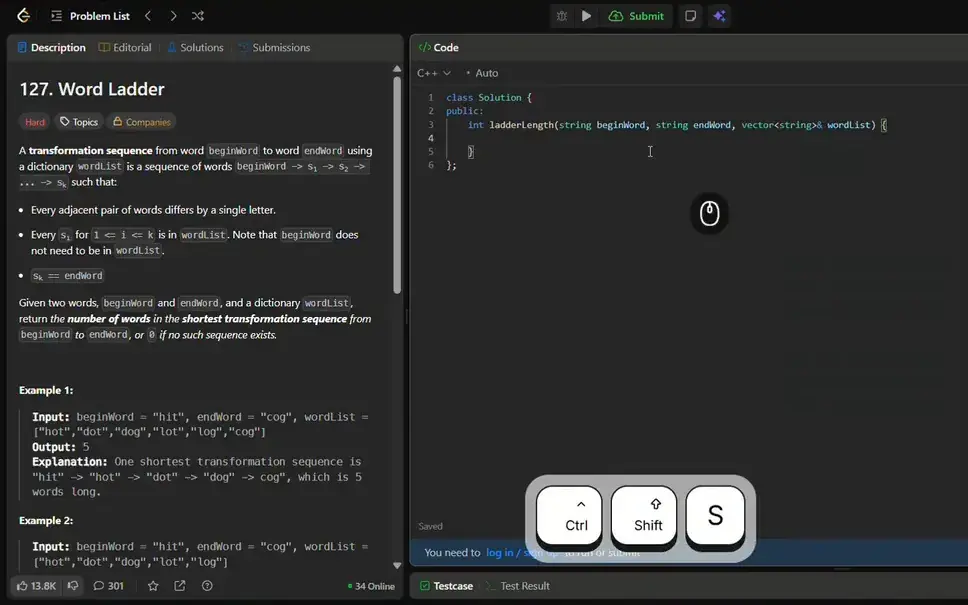
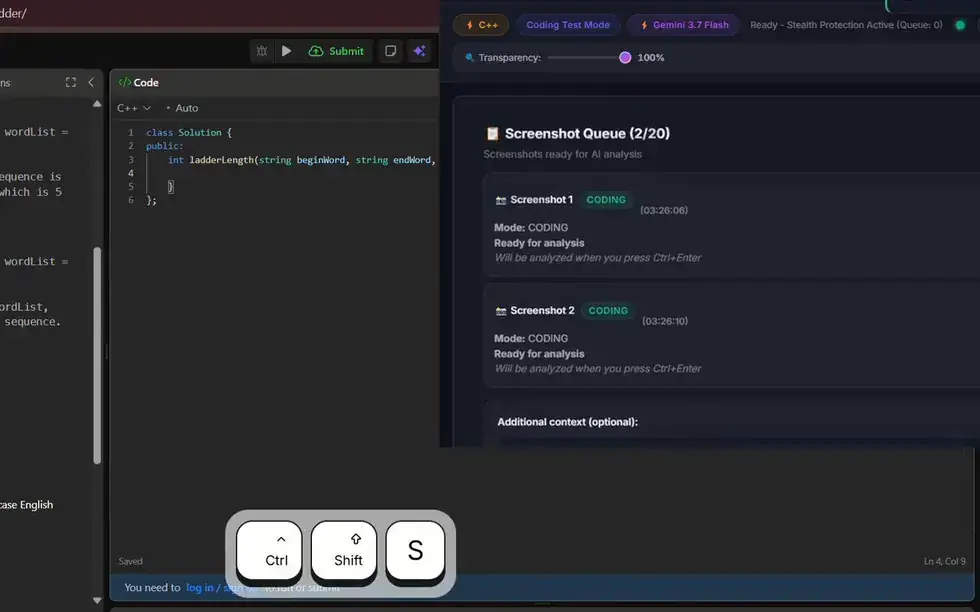
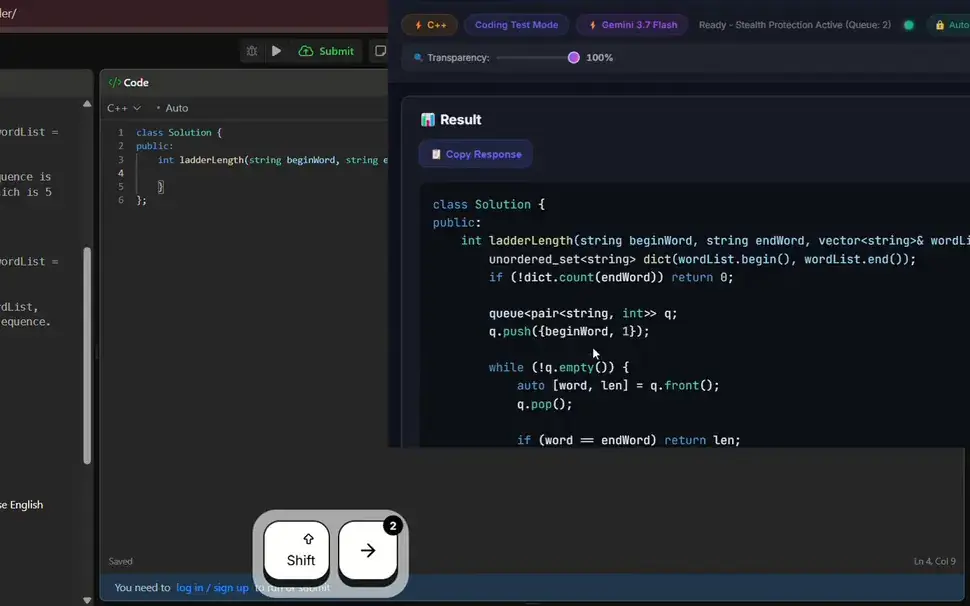
Set your default language in the app, or switch with CtrlShiftL. Over 10 languages are supported, including Python, Java, C++ and JavaScript.
Multiple-choice questions: MCQ mode
Switch to MCQ mode with CtrlShiftSpace, capture the question and its options, and send. The overlay shows the answer. It works the same way for language trivia, snippet-output questions and aptitude items.
SQL, debugging and everything else: Query mode
Capture what is on screen, type what you want to know ("write the query", "why does this fail the third test?") and send. Query mode keeps the conversation, so you can ask a follow-up about the same screen.
Platforms it works alongside
Because Solvro runs outside the browser, it does not depend on the assessment site. These are the platforms candidates meet most often:
| Platform | Typical use | Solvro modes |
|---|---|---|
| HackerRank | Coding, MCQ and SQL screening tests | Coding Test, MCQ, Query |
| CodeSignal | Timed coding assessments | Coding Test |
| Codility | Timed coding tasks | Coding Test |
| CoderPad | Live coding interviews and take-home screens | Coding Test, Interview |
| LeetCode | Practice and company-run contests | Coding Test |
| TestGorilla | Skills and aptitude tests, mostly multiple choice | MCQ, Query |
Getting code into the editor
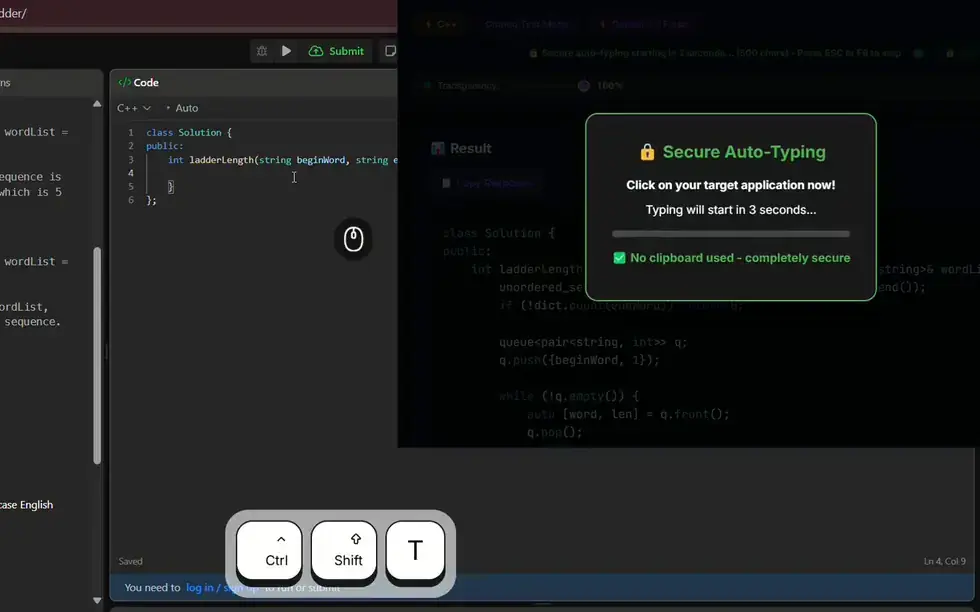
You can type the solution yourself from the explanation, which is often the better choice when you will be asked to walk through it later. Or let Solvro's auto-typing type it for you: it types keystroke by keystroke with varied timing instead of pasting, counts down before it starts, and can resume from the exact character where it stopped.
Models for hard problems
The Gemini models answer fastest and suit most OA questions. For a hard dynamic-programming or graph problem, switch to Claude Opus 5 or Claude Fable 5 with CtrlShiftM; they take a little longer and reason more deeply. The full list is Gemini 3.7 Flash, Gemini 3.1 Pro, Claude Sonnet 5, Claude Opus 5 and Claude Fable 5.
Read the rules first
Assessment platforms tell candidates what they record before the test starts. Many log tab switches and pasted text, and some record the webcam or the screen. Employers usually forbid outside help in the test's terms, and a flagged result can end an application. Read the instructions on the start page, and decide for yourself.
Check the rules first
Most employers and assessment platforms prohibit outside help in their terms. Solvro keeps its window out of screen captures, but no tool can promise it will never be noticed, and breaking those rules can cost you an offer. Decide for yourself whether that risk is worth taking.
Which plan covers online assessments
Online assessments need Coding Test, MCQ and Query modes, which every paid plan includes. Pro is $29 a month, or $19 a month billed quarterly. If the assessment is followed by a live interview, Pro+ adds Interview mode and the Claude models, and the $24 Sprint Pass covers a single week of everything.
| Plan | Price | Billing | What you get |
|---|---|---|---|
| Pro | $29/mo | Billed monthly ($29). | Gemini models, every mode except Interview |
| Pro (quarterly) | $19/mo | $57 billed every 3 months. | Same as Pro monthly |
| Pro+ | $49/mo | Billed monthly. | All five models, all four modes including Interview |
| Pro+ (quarterly) | $39/mo | $117 billed every 3 months. | Same as Pro+ monthly |
| Eternal Pass | $29/mo | $348 billed yearly. | All Pro+ features for a full year |
| Sprint Pass | $24 once | 7-day access. | All Pro+ features for 7 days, no subscription |
| Free trial | $0 | No card required | 10 AI answers and 10 minutes of Interview mode |
Prices in USD; customers in India are charged the rupee equivalent. Full details on the pricing section.
Frequently asked questions
It is an app that reads questions from an online assessment, such as coding problems, multiple-choice questions or SQL tasks, and returns an answer in seconds. Solvro does this from a screenshot taken with Ctrl Shift S.
Solvro is a desktop app that runs outside the browser, so it works alongside any assessment site, including HackerRank, CodeSignal, Codility, CoderPad, LeetCode and TestGorilla.
Yes. MCQ mode reads the question and its options from a screenshot and shows the answer. It covers language questions, snippet-output questions and aptitude items.
Over 10, including Python, Java, C++ and JavaScript. Set a default in the app or switch with Ctrl Shift L.
Any paid plan. Pro at $29 a month includes Coding Test, MCQ and Query modes with the Gemini models. Pro+ and the $24 Sprint Pass add Interview mode and the Claude models.
Usually not. Most assessments forbid outside help in their terms, and platforms often record tab switches, pasted text or the webcam. Read the rules on the start page before you decide.