What is an AI interview assistant?
An AI interview assistant, also called an AI interview copilot or real-time interview helper, is software that runs beside a live interview or online assessment. It captures the question (by transcribing the interviewer's voice or by reading a screenshot), sends it to a large language model together with your resume and the job description, and shows a structured answer in an overlay on your own screen while the conversation is still going.
Three kinds of products share the name, and they do different jobs:
| Kind of tool | When it runs | What it does | Examples |
|---|---|---|---|
| Real-time interview assistant | During the real interview or test | Suggests answers, code and talking points live | Solvro, Final Round AI, LockedIn AI, Parakeet AI |
| AI mock interview tool | Before the interview | Asks practice questions and scores your answers | Google Interview Warmup, Yoodli, Huru |
| AI interviewer | Run by the employer | Interviews or screens candidates on the employer's behalf | HireVue, Mercor's AI interviewer |
This page is about the first kind. For practice tools, see the AI interview prep tools guide.
How a real-time interview assistant works
Every real-time assistant runs the same loop. The quality of each step is what separates them.
- Capture. The app hears the interviewer through your computer's system audio and transcribes it as they speak, or takes a screenshot of a question on screen.
- Detect the question. It works out where a question starts and ends, so it answers the question rather than the small talk around it.
- Add your context. Your resume, the job description and your own instructions travel with the question, so the answer can cite your projects and numbers.
- Generate. A large language model writes a structured answer: a one-line point first, then short supporting bullets, or an approach, complexity and code for a programming problem.
- Display. The answer appears in an overlay on your screen. A good assistant keeps that window out of screen shares and recordings, and lets you move, fade or hide it from the keyboard.
In Solvro, steps one to five take a few seconds. Interview mode starts the loop from audio; Coding Test, MCQ and Query modes start it from a screenshot taken with CtrlShiftS.
What it can help with
Interviews come in several formats, and each needs a different input and a different kind of answer.
| Format | What you need from an assistant | Solvro mode | Read more |
|---|---|---|---|
| Video interview on Zoom, Teams or Meet | Hear the question, answer in seconds | Interview | Zoom, Teams and Google Meet |
| Behavioral round | STAR stories from your own experience | Interview | Behavioral interviews |
| Online assessment | Read a coding problem or MCQ from the screen | Coding Test, MCQ | Online assessments |
| Live coding | Approach, complexity, working code | Coding Test | AI coding interview assistants |
| System design | Structure, estimates, trade-offs | Interview, Query | System design interviews |
| One-way video (HireVue) | Read an on-screen question during prep time | Query, Interview | HireVue and one-way video |
AI interview assistant vs ChatGPT
ChatGPT, Claude and Gemini are excellent for preparation, and their free tiers cost nothing. In a live interview they run into practical problems that a dedicated assistant is built around.
| ChatGPT in a browser tab | A dedicated assistant like Solvro | |
|---|---|---|
| Hears the interviewer | No, you type or paste the question | Yes, live transcription of system audio |
| Reads a coding problem | Only if you upload a screenshot by hand | One shortcut captures the screen |
| In a full-screen share | The tab is visible like any other window | The overlay is excluded from screen capture |
| Knows your background | Only what you paste into each chat | Resume, job description and instructions saved once |
| Hands on the keyboard | Clicking, typing, switching tabs | Every action has a shortcut |
| Getting code into an editor | Copy and paste | Auto-typing with human timing, or type it yourself |
If you only want to rehearse answers the night before, a general chatbot is enough; see ChatGPT, Claude or Gemini for interviews for prompts that work. The dedicated tool earns its price during the call itself.
What to look for in an AI interview assistant
- Speed. An answer that arrives after you have started talking is no help. Look for answers within a few seconds.
- Personal context. Generic answers are easy to spot. The assistant should use your resume and the job description.
- Modes for each format. Conversation, coding problems and multiple-choice questions need different inputs and outputs.
- Screen-share behaviour. A desktop app can keep its window out of a capture; a browser tab or extension cannot.
- Model choice. Fast models for conversation, stronger reasoning models for hard problems.
- Keyboard control. Clicking around on camera is visible. Everything should be reachable by shortcut.
- A real free trial. You should be able to test it in a mock call before paying.
Solvro at a glance
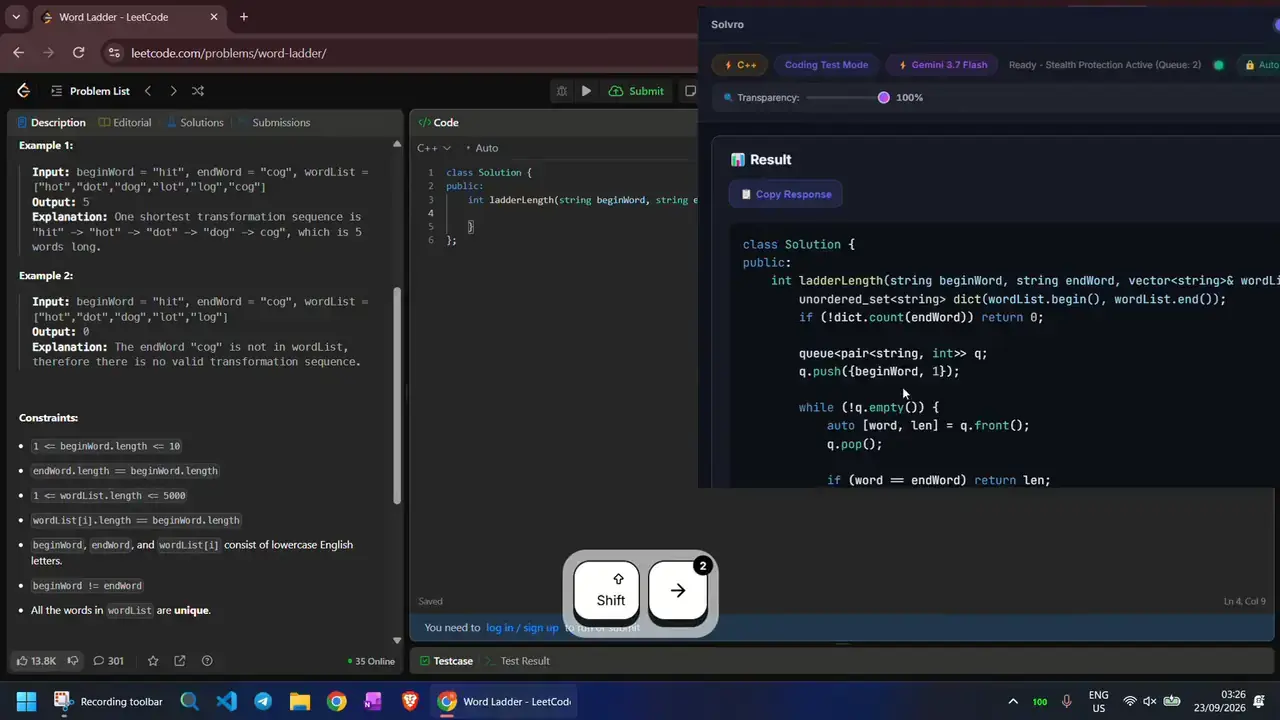
| Solvro | |
|---|---|
| Runs on | Windows 10 or 11 and macOS on Apple Silicon |
| Modes | Interview, Coding Test, MCQ Test, Query |
| Input | Live transcription of system audio, screenshots with CtrlShiftS |
| Personal context | Resume, job description, extra context and custom instructions |
| Models | Gemini 3.7 Flash, Gemini 3.1 Pro, Claude Sonnet 5, Claude Opus 5 and Claude Fable 5 |
| Screen sharing | Sets the operating system's content-protection flag, which excludes its window from capture and recording |
| Coding output | Approach, complexity and code in over 10 languages, with optional auto-typing |
| Free trial | 10 AI answers and 10 minutes of Interview mode, no card |
| Paid plans | From $29 a month; Interview mode from $49 a month or $24 for a 7-day Sprint Pass |
Limits worth knowing
- Models can be wrong. Read an answer before you repeat it, and check code before you submit it.
- Reading aloud sounds like reading. Use the first line to start talking and the bullets as prompts, in your own words.
- Nothing is guaranteed to stay unseen. Solvro keeps its window out of screen captures, but a camera still sees where your eyes go, and no tool can promise it will never be noticed by every proctoring product.
- Rules come first. Many employers and assessment platforms prohibit outside help. Read them before you decide.
Check the rules first
Most employers and assessment platforms prohibit outside help in their terms. Solvro keeps its window out of screen captures, but no tool can promise it will never be noticed, and breaking those rules can cost you an offer. Decide for yourself whether that risk is worth taking.
Frequently asked questions
It is a desktop app that runs beside a live interview or online assessment, hears or reads each question, and shows a suggested answer within seconds in a window only you can see. Solvro does this with Interview, Coding Test, MCQ and Query modes.
Solvro transcribes your computer's system audio, which is where the interviewer's voice plays on Zoom, Teams, Google Meet or Webex. No bot joins the call. For questions on screen, it reads a screenshot taken with Ctrl Shift S.
Solvro sets the operating system's content-protection flag, which excludes its window from screen capture and recording, so it does not appear in a normal screen share. Your camera still shows where you look, and no tool can promise it will never be noticed, so rehearse first and check the rules.
For preparation, ChatGPT is fine and often free. In a live call, a dedicated assistant hears the question, reads the screen with one shortcut, knows your resume and keeps its window out of the share, which a browser tab cannot do.
Solvro has a free trial of 10 AI answers and 10 minutes of Interview mode with no card. Paid plans start at $29 a month, and the Sprint Pass is $24 for 7 days.
It depends on the employer and the platform. Many prohibit outside help in their terms, and breaking them can cost you an offer. Read the rules for each interview before you decide.